Using the ITD Curriculum
Where to find the ITD Syllabus
Before you can review the work submitted by applicants, you should familiarise yourself with the syllabus.
This is the ITD syllabus.
Applicants will work through the steps week by week. Each step contains instructions for the applicants to do complete a task which they should then submit. Volunteers can find these submissions on the dashboard and give feedback.
Tip: You can read all the steps right here in the menu “Steps”.
The Workshops will be organised by each region, and are designed to be face-to-face opportunities for applicants to ask questions and clarify their learning. Workshops will be advertised on Eventbrite and advertised in Slack.
You will find that each step has a number of sub-components reachable via a menu which looks like this: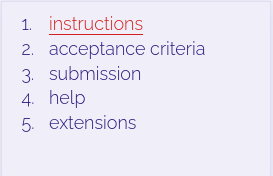
- The Instructions tell the applicant what to do. Volunteers should read this too so that you fully understand what is being asked of the volunteers in each step.
- The acceptance criteria list everything the the applicant must do to successfully complete the step.
- The Submission item tells the applicants what to submit. Volunteers can find these submissions in the dashboard.
- The Help item tells the applicants how to get help.
- The Extensions item gives a suggestion of other things a applicant can do in this step, but which don’t have to be submitted.